








Skip to content

Siemens NX Training Bundle

✔ Get multiple Siemens NX courses in one package.
✔ Fundamentals to advance training.
✔ Self-paced courses. Learn anywhere, anytime.
✔ Doubt clearance support via email.
✔ Certification on Completion.
✔ 1 Full Year validity.
✔ Join 100,000+ learners.

💥 Everything for Just $399/Year

Courses are created by Tata Technologies CAD experts and senior design engineers.

Siemens NX Masthead

Trusted by leading companies

Siemens NX Bundle Highlights

Access to All Siemens NX Training

Get unlimited access to Siemens NX CAD, CAM, Simulation & PLM courses under one plan.

Beginner to Advanced Learning Path

Start from NX basics and progress to advanced assemblies, simulation, and manufacturing workflows.

Latest + Legacy NX Versions Covered

Learn across NX 5 to NX 2306, including all major CAD & CAM updates.

Industry-Aligned Curriculum

Structured training designed by Tata Technologies professionals, aligned with real engineering workflows.

Doubt clearance support from subject matter experts (SMEs) via email

Learners can get their queries resolved through email support from our SMEs. Our SMEs team is consists of professional design engineers & CAD experts from Tata technologies.

NX CAD + CAM + Teamcenter Integration

Learn NX the way it’s used in enterprises with Teamcenter PLM integration modules.

Flexible, Self-Paced Learning

Learn anytime, anywhere — pause, revisit, and progress at your own pace.

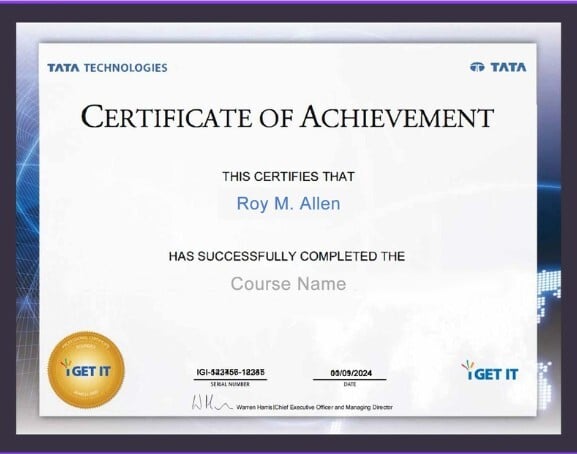
Certificate of Completion

Earn an industry-recognized certificate that adds value to your resume.

Courses Covered in Our Siemens NX Training Bundle:

NX Fundamentals & Core Essentials
  • NX New User Essentials
  • NX Gateway: Basics & User Interface
  • NX 101 Gateway
  • NX 102 Working with Parts
  • NX 103 Basic Sketcher
  • NX 104 Basic Modeling
  • NX 105 Assemblies
  • NX 106 Drafting
  • NX 107 New Sketcher
  • NX Visualization Essentials
  • NX Curve Creation
  • NX Drafting
  • NX Assemblies
  • NX Modeling
  • NX Freeform Modeling
  • NX Sheet Metal
  • NX Synchronous Modeling
NX Intermediate Design & Engineering
  • NX Advanced Drafting
  • NX Product & Manufacturing Information (PMI)
  • NX Realize Shape
  • NX Freeform Modeling (Intermediate)
  • NX Working with Large Assemblies
  • NX Mechanical Routing
  • NX Electrical Routing & Harness
  • NX WAVE Engineering
  • NX Knowledge Fusion Essentials
  • NX Advanced User Express
NX Advanced Design, Simulation & Optimization
  • NX Advanced Modeling
  • NX Advanced Assemblies
  • NX Advanced Sketcher
  • NX Shape Studio
  • NX Design Simulation
  • NX Motion Simulation
  • NX Advanced Simulation
  • NX Resource & Property Optimization
  • NX Freeform Modeling (Advanced)
NX Manufacturing (CAM)
  • NX CAM Quick Start to Basic Manufacturing
  • NX Basic Manufacturing
  • NX Advanced Manufacturing
  • NX CAM Hole Making
  • NX Turning / Lathe
  • NX CAD–CAM Integration
  • NX Manufacturing Workflow Best Practices
NX Version Updates – CAD
  • NX 5 → NX 7.5 CAD Updates
  • NX 6 → NX 7.5 CAD Updates
  • NX 7.5 → NX 8.5 CAD Updates
  • NX 7.5 → NX 9 CAD Updates
  • NX 7.5 → NX 10 CAD Updates
  • NX 8 → NX 9 CAD Updates
  • NX 8.5 → NX 10 CAD Updates
  • NX 9 → NX 11 CAD Updates
  • NX 10 → NX 11 CAD Updates
  • NX 11 → 1847 / 1872 / 1899 Series CAD Updates
  • NX 12 → 1899 / 1926 Series CAD Updates
  • NX 1847 → 1953 / 2206 Series CAD Updates
  • NX 1953 → 1980 / 2206 Series CAD Updates
  • NX 1980 → 2206 Series CAD Updates
  • NX 2212 → NX 2306 Series CAD Updates
  • What’s New in NX (Major Releases)
NX Version Updates – CAM
  • NX 5 → NX 7.5 CAM Updates
  • NX 6 → NX 7.5 CAM Updates
  • NX 6 → NX 8.5 CAM Updates
  • NX 7.5 → NX 8.5 CAM Updates
  • NX 7.5 → NX 9 CAM Updates
  • NX 9 → NX 10 CAM Updates
  • NX 10 → NX 11 CAM Updates
  • NX 11 → 1899 / 1926 Series CAM Updates
  • NX 12 → 1899 / 1926 Series CAM Updates
Teamcenter + NX (PLM Integration)
  • Teamcenter Rich Client Essentials
  • Teamcenter Rich Client for Consumers
  • Teamcenter Rich Client for Authors
  • Teamcenter NX CAD Integration
  • Teamcenter Visualization Mockup
  • Teamcenter Visualization Professional
  • Teamcenter CATIA Integration
  • Teamcenter PTC Creo Integration
  • Teamcenter Change Manager
  • Teamcenter Manufacturing (Light & Advanced Users)
  • Teamcenter Structure Manager
Specialized & Language-Specific Modules
  • NX Essentials for New Users (Spanish)
  • NX Basic Manufacturing (Spanish)
  • NX Advanced Essentials (Spanish)
  • NX Design Thinking Using Realize Shape
i GET IT- Certificate

Earn Certification from Tata Technologies on completion of each course.

Get globally recognized credentials to 
showcase your expertise. 

Why Choose the Siemens NX Training Bundle?

  • All Skill Levels Covered – Basic, Intermediate & Advanced
  • Complete CAD + CAM + Simulation Coverage
  • Teamcenter Integration Modules Included
  • Version Update Courses Included (NX 5 → NX 2306)
  • Self-paced, expert-led learning
  • Industry-aligned workflows & real use cases
Why Choose Siemens NX Training?
Who This Bundle is For

This Bundle is Suitable for

  • Students & Fresh Graduates – Build job-ready NX skills
  • Design Engineers – Upgrade CAD/CAM expertise
  • Manufacturing Engineers – Master NX CAM workflows
  • Professionals Migrating Versions – Learn what’s new, fast
  • Enterprises & Teams – Standardized NX upskilling

Contact Us

Build Industry-Ready Siemens NX Expertise

Master Siemens NX with hands-on, workflow-driven training curated by Tata Technologies professionals.

Work on practical design and manufacturing scenarios using NX CAD, CAM, and advanced modeling tools.

Receive a globally recognized certificate that validates your NX proficiency and enhances employability.

Open pathways to roles including Design Engineer, Manufacturing Engineer, NX CAM Programmer, and PLM Engineer.

Hear from our learners

"The EV bundle helped me build a strong, application-oriented foundation in EV architecture, battery management systems, and thermal engineering. The structured learning directly supported my transition into an OEM role, enabling me to work with confidence on vehicle and battery" technologies

Ramakrishna Uppati
Service Engineer, Ather Energy

“Learning 20+ industry tools like CATIA, SolidWorks, NX, and Teamcenter completely transformed my CAD skills. This EV bundle boosted my confidence and prepared me for real opportunities in the EV industry.”

Sumit Gavali
Project Engineer, Plast-Pro Solutions

“The MCAD + EV Bundle offers a well-structured learning experience that combines mechanical design tools with core electric vehicle concepts. The practical orientation of the curriculum supports real-world engineering requirements and professional upskilling.”

Automotive Design Engineer

OEM / Tier-1 Organisation

Not sure where to start?